LiveMarks

LiveMarks™

AI-Ready over Local Wi-Fi  ·  A/B Reference  ·  Record & Mark

The mobile audio companion that adapts to your workflow—AI-ready over local Wi-Fi. Test mixes where real listening happens with sample-accurate A/B and automated LUFS level matching—or switch to Simple Mode for distraction-free recording, thumb-tap cue markers, and practice looping. Connect seamlessly to desktop DAWs and AI coding agents with local Wi-Fi Studio, open JSON markers, and 100% offline.

Two Modes, One App

Tailor LiveMarks to your workflow. Switch at any time with a single tap.

🎧

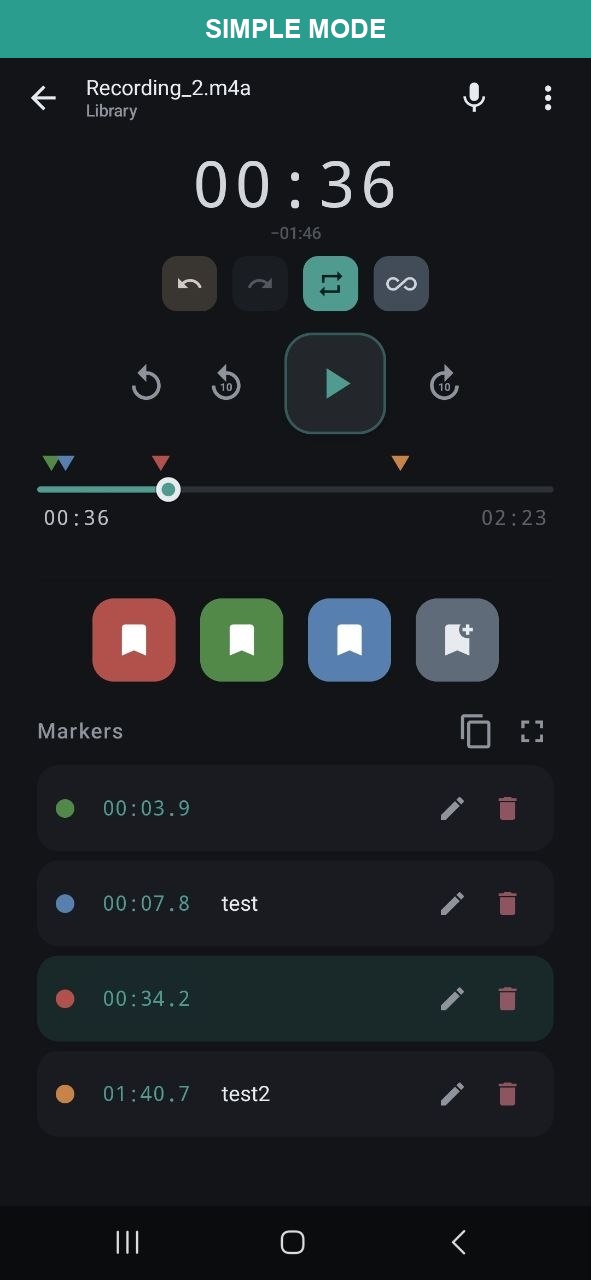
Simple Mode: Record & Mark

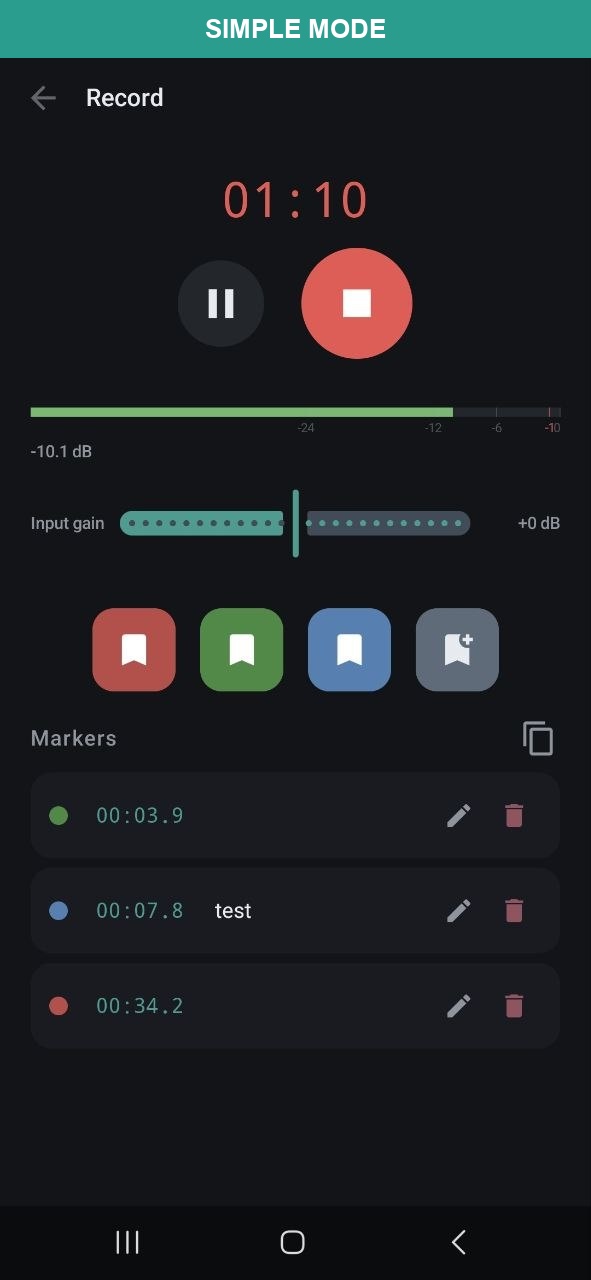
For musicians, singers, dancers, and everyday recording. Clean WAV audio, thumb-tap cue markers, and seamless section looping for rehearsal—distraction-free with zero clutter.

🎛️

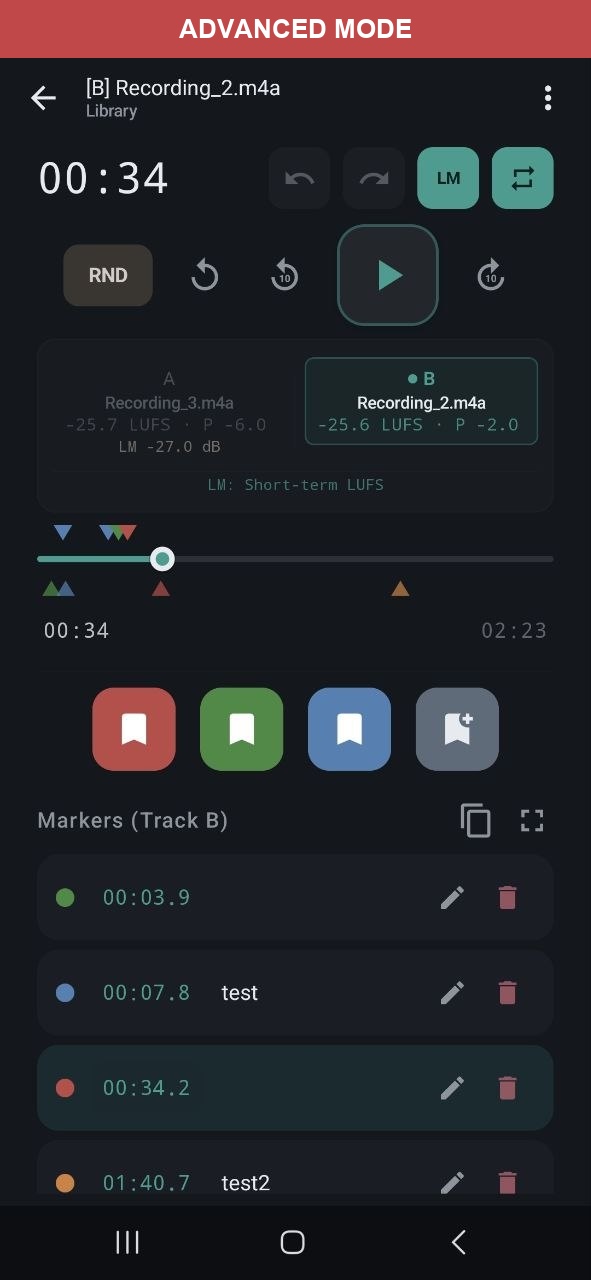
Advanced Mode: Studio & Reference

For audio engineers and music producers. Test mixes on AirPods or in the car with 50ms equal-power A/B switching, automated LUFS level matching, Wi-Fi desktop sync, and live Mastering Console metrics.

🔒 100% Offline 🎧 A/B Volume matching 🤖 AI-Ready over Local Wi-Fi 📄 Open JSON Markers 📝 Markers 🎤 Recording 📊 LUFS Analysis 🎛️ Level Match 🔊 Soundcard selection 🎚️ Auto-Gain & Limiter ⏰ Scheduled playback 📜 Playback History 💾 WAV Export with marks 🌐 EN · DE · NO · ES · PT · FR
Get it on Google Play Download on the App Store 📖 User Guide →
Free for basic use. One-time Pro unlock for unlimited markers.

Screenshots

A look inside LiveMarks's interface.

Recording Mode
Recording
Playback
Playback
A/B Compare
A/B Compare

Pro Tools

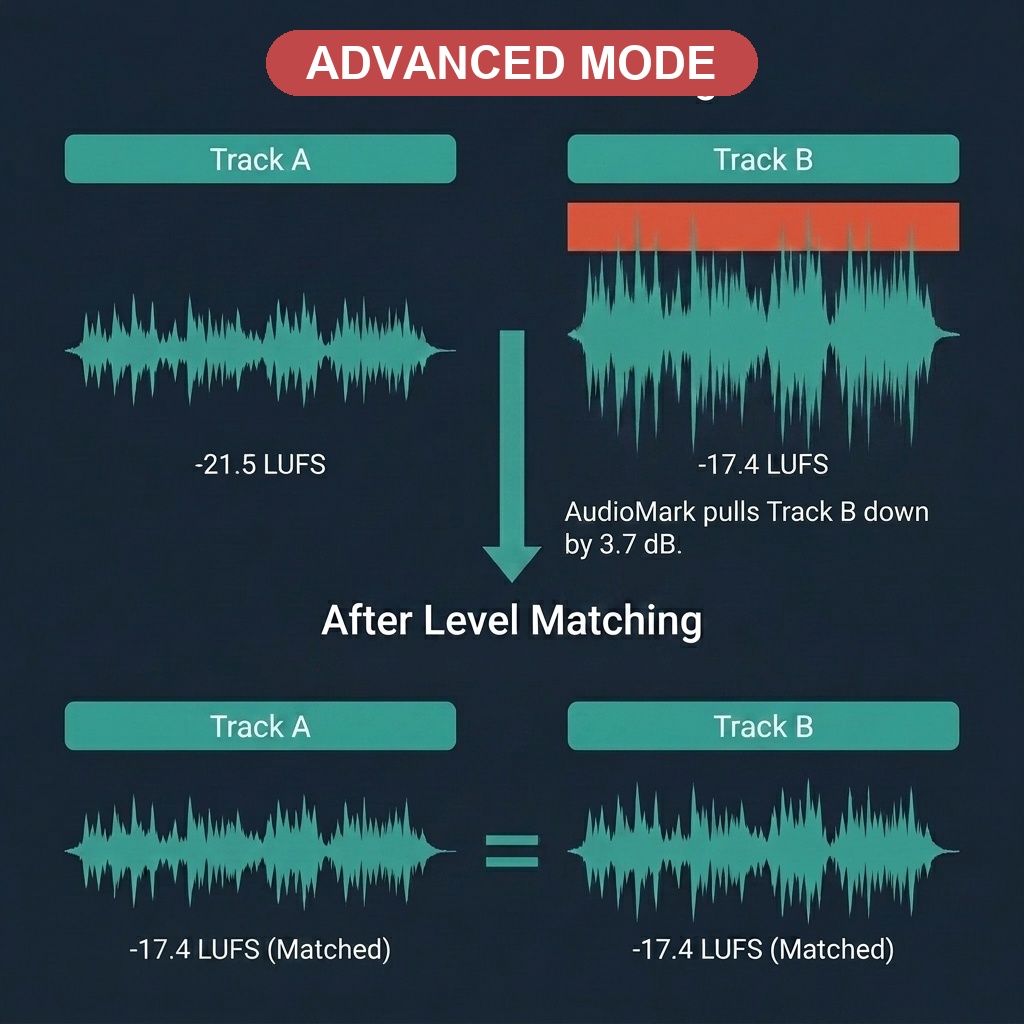
Level matching and seamless network export.

Level Matched Playlists
Level Matched Playlist
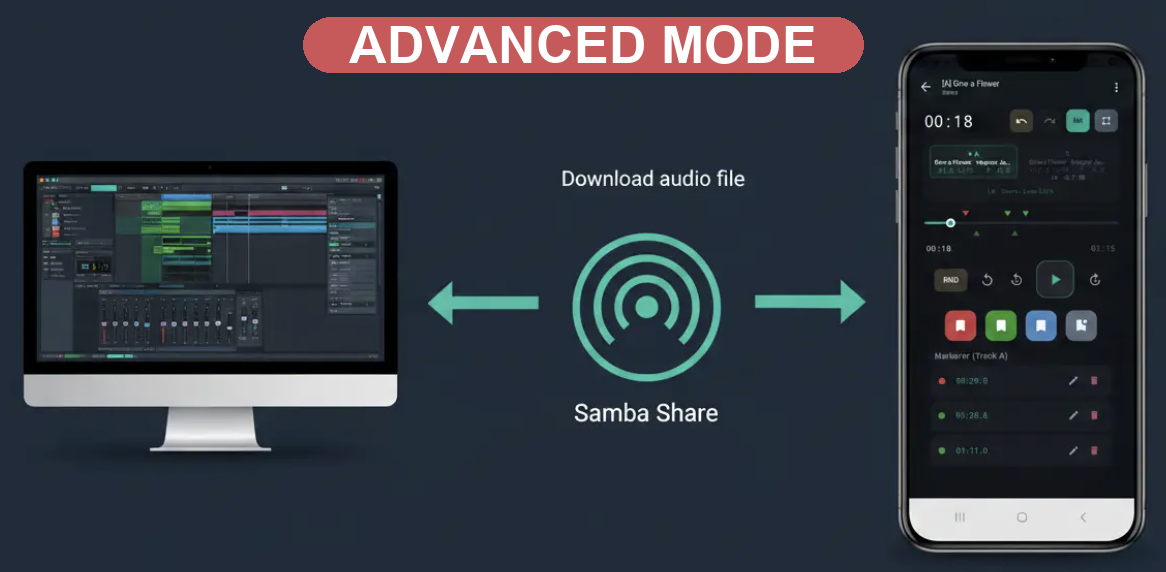
Wi-Fi Studio, Samba Network and WAV Export
Wi-Fi Studio, Samba Network & WAV Export with markers

Everything you need

Audio tools in your pocket — no cloud, no sign-up, no nonsense.

🎧

Play & Mark

Import MP3, WAV, M4A, or FLAC. Place colour-coded markers while listening. Edit notes, tags, and precise timestamps. Drag to adjust. Full undo/redo.

⚡

A/B Referencing

Compare tracks easily using 50ms equal-power crossfades. LUFS-based level matching (EBU R128) ensures you compare the actual sound and frequency balance, not just the volume.

🎤

Record

Record with real-time level meter and live marker placement. Lossless WAV (16-bit, 44.1 kHz) or compact AAC/M4A. Auto-imported when done.

🔊

Soundcard Selection

Select input and output audio devices — built-in mic, USB audio interfaces, Bluetooth, wired headsets. Auto-fallback when a device is disconnected. Specs shown per device.

🎚️

Auto-Gain & Compressor

Built-in gentle compressor with adaptive threshold, 2:1 ratio, soft knee, and brick-wall limiter at −1 dBFS. Continuous auto-gain (AGC) keeps output peaks consistent. Adjustable input gain (−12 to +12 dB).

🔁

Marker Loop

Loop between any two markers for focused listening — perfect for practicing instruments, studying sections, or reviewing specific passages. Sample-accurate timing.

📋

Level-Matched Playlists

The Level Match (LM) feature automatically balances volume across mixed-quality files. Perfect for listening to your own demos alongside commercial masters for seamless, professional referencing.

⏰

Scheduled Playback

Automate your listening. Schedule any saved playlist to trigger at a specific time with a gentle 30-second volume fade-in—perfect for morning routines or automated environment checks.

📊

Audio Analysis

K-weighted LUFS (EBU R128 / ITU-R BS.1770), short-term LUFS (3 s windows), peak dBFS, sample rate, channels, bit depth — all computed locally.

📤

Export & Import

ZIP export with markers + audio. Direct SMB network export to Windows, macOS, Linux. Share your audio and markers directly to other apps on your device. Import audio files, ZIP exports, or from network shares.

📂

Projects

Organise files into workspaces. Move files between projects. Cross-project search by name, ID3 metadata, marker notes, and tags.

📜

Playback History

Keep track of your sessions automatically. The dedicated Playback History screen retains your last 1,000 played tracks, supports file selections, A/B comparisons, custom metadata/project management, and is easily accessible from any player overflow menu.

🎵

ID3 Metadata

Auto-reads artist, title, album, composer, publisher, comment from MP3s (ID3v1/v2, Vorbis, MP4 atoms). Shown everywhere — library, player, lockscreen, search.

📱

Landscape Mode

Full landscape support across all screens — player, library, recorder, and project overview. Two-column layout in landscape for efficient use of screen space.

💾

WAV Export with Markers

Export WAV files with embedded cue/adtl chunks following the RIFF standard, ensuring your markers and notes carry over. Tested in Reaper.

🤖

AI Agent & Localhost Sync

Connect LiveMarks directly to your local AI coding agents (Claude, ChatGPT, Antigravity) via Model Context Protocol (MCP) or localhost REST API. Inspect projects, trigger lossless recordings, query cue markers, and automate audio workflows directly from your desktop development environment.

Compatibility & Tech Specs

Built to play nice with your existing studio workflow.

📁

Samba (SMB) Network Export

Export high-quality WAV files and complete project archives directly to your Windows, macOS, or Linux network shares. Perfect for immediate backup or transferring sessions to your main workstation.

🎧

Gapless A/B Switching

The custom dual-track mixer engine uses a 150ms hardware priming delay to ensure completely gapless and skip-free transitions when switching between reference tracks.

🎛️

Reaper & DAW Compatibility

Exported WAV files embed your markers as standard RIFF cue chunks. These import seamlessly into Reaper (and other compatible DAWs) without any conversion required.

Built for

Whether you're reviewing mixes, practicing, or studying — LiveMarks fits your workflow.

🎛️ Compare multiple mixes
🎸 Practice with looped segments
🤖 Review AI-generated music
📝 Annotate recordings
🎓 Study audio & lectures
🎙️ Review podcast edits
🏠 Import/export via SMB
🔊 Evaluate mastering passes
🎤 Record with USB interfaces
🎚️ Controlled recording levels
⏰ Automate playback routines

🔒 Privacy First

LiveMarks works 100% offline with minimal data collection. No accounts, no ads, no in-app analytics, no tracking in the app itself. All your data stays on your device. App stores (Apple App Store / Google Play) provide optional anonymous crash diagnostics (see Privacy Policy for details). GDPR compliant. Designed following OWASP MASVS L1 guidelines.

No Cloud No In-App Analytics No Ads No Tracking (in-app) No Timestamps GDPR Compliant OWASP MASVS L1

👤 Built by One Developer

LiveMarks is designed, built, and maintained by a single indie developer. It's a complex app — dual audio engine with real-time sync, DSP signal processing, EBU R128 loudness analysis, custom metadata readers, SMB networking, and three player modes in one screen. Every release is verified with a suite of 73 automated tests, automated Robot UI scripts, and structured manual checks on a real device, alongside personal usability checks to ensure everything feels just right. If you find a bug, please report it — I read every message and fix issues as fast as I can.

Release History

Follow the journey of LiveMarks as we build the best mobile workflow for audio professionals.

Get in Touch

Found a bug, have a feature request, or just want to say hi? I'd love to hear from you.

Ready to listen?

Record and mark effortlessly in Simple Mode. Switch to Advanced Mode for pro A/B tools. Upgrade with a single one-time payment for unlimited markers.

Get it on Google Play Download on the App Store